
Digital Banking

Streamline your day with smart tools. Secure, reliable digital banking you can trust.

Woman typing on computer
Online & Mobile Banking

Your life doesn’t run on branch hours. Your banking shouldn’t either.

Check balances, pay bills, move money, deposit checks, and find important documents. Online & Mobile Banking is available 24/7.

Whether you’re checking your balance between errands, making transfers, or handling bills from the couch, your accounts are ready when you are.

  • Mobile-Phone--Streamline-MicroBank anywhere
  • icon-dollarMove money easily
  • Shield-Check--Streamline-MicroSecure access

Features

Pay bills

Move money between accounts

Deposit checks

Transfer money with Zelle®

Enroll in Online & Mobile Banking

  1. Download the Tyndall Mobile app from the Apple App Store or Google Play. Or, if you prefer to use a web browser, you can enroll in Online Banking.
  2. Click Register.
  3. You’ll be asked to agree to the Online & Mobile Banking terms and conditions.
  4. Next, you’ll fill out your information. The boxes with the asterisk (*) are required.
  5. Click Submit.
  6. Create a User ID and Password. Confirm Password and click Register.

    User IDs must be 8 to 26 characters long. To protect your account, User IDs should not include any personal information such as your email, name, birth date, member number, or any other easily identifiable details.

    Passwords must be a minimum of 12 characters long. Passwords must include a combination of uppercase and lowercase letters, numbers, and symbols. Passwords do not expire and cannot be reused.
  7. You'll receive a text or call with a verification code; enter it on the screen to proceed.
Paperless Statements

Skip the paper. Save a tree.

With Paperless Statements, your statements, notices, and tax forms are available to view in Online & Mobile Banking whenever you need them—and we’ll email you when something new is ready. Going paperless is a greener way to stay organized!

  • Favorite-Like-Hand--Streamline-MicroFree
  • Multiple-Files--Streamline-MicroLess paper to manage
  • icon-lightbulbConvenient
Couple on couch on phone

Features

No fee to enroll

Access through your protected Online & Mobile Banking login

Access statements for up to three years

Digital Card in mobile wallet
Card Activation

Ready, Set, Spend

Your new Tyndall card is almost ready to go! Whether you’re using a digital card or your physical card, you’re just a few steps away from getting started.  

  • Time-Clock-Circle--Streamline-MicroNo wait; activate your digital card
  • Atm-Card-1--Streamline-MicroAdd your card to your Mobile Wallet
  • Mobile-Phone--Streamline-MicroManage your card in the Tyndall Cards App

Convenience You Can Count On

Immediate Access

You no longer have to wait for your card to arrive in the mail. With digital card access, you’ll have immediate access to your funds so you can continue making purchases without interruption while your physical card is on its way. 

Physical Card on the Way

Your physical card will arrive within 10 to 14 business days. 

Mobile Wallet

Add your digital card to your Apple or Google Wallet for fast, secure checkout in stores or online. 

Ready to set up your Digital Card?

Need help using your Mobile Wallet? (Apple)

Need help using your Mobile Wallet? (Google)

Physical Card Activation

You’ve received your card; now it’s time to start using it. Activate your new card at 850-769-9999 and set your PIN as soon as possible.

Mobile Wallet

Tap. Pay. Be on your way.

Leave the card shuffle behind. Add your Tyndall Debit or Credit Card to your Mobile Wallet and enjoy a simpler way to pay on the go.

All Tyndall Debit and Credit Cards are compatible with Google Pay, Apple Pay, and Samsung Wallet.

  • Flash-1--Streamline-MicroFast
  • Mobile-Phone--Streamline-MicroEasy to carry
  • Shopping-Basket-1--Streamline-MicroIn-store and online
Young woman using mobile wallet at store

As a thank you to all our members, you* may access $5,000 of Accidental Death & Dismemberment (AD&D) insurance at no cost to you.

For more information, including costs, exclusions, limitations, and terms of coverage, please call IAS, the Plan Administrator, toll-free, at (833) 241-2372. IAS is available from 8 a.m. – 7 p.m. Central, Monday through Friday.

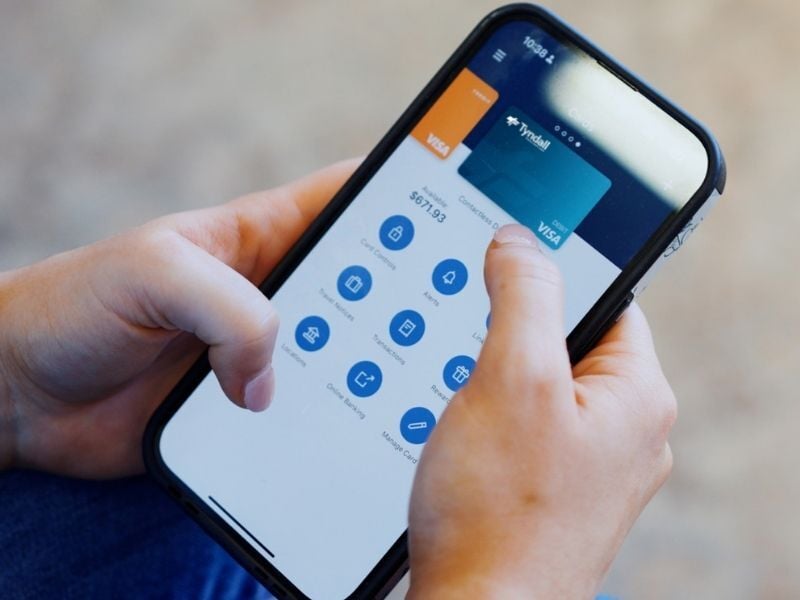
Tyndall cards app on phone
Tyndall Cards App

Card control in your pocket.

The Tyndall Cards app is your go-to spot for keeping tabs on your Debit or Credit Card. Misplace your card? Turn it off in the app. Spot a charge you don’t recognize? Get alerts and review recent activity. Heading out of town? Set a travel notice before takeoff.

  • Mobile-Phone--Streamline-MicroCard Control
  • Tasks-Projects--Streamline-MicroSubscription Manager
  • Airport-Plane--Streamline-MicroTravel Notices
  • Correct-Password--Streamline-MicroManage Pin
  • Receipt--Streamline-MicroAccount History

Features

Link your card to your Mobile Wallet

Turn your card on or off

Instant transaction alerts

Easily update your PIN

Text Banking

Check your available balance, view recent transactions, and more.

Set up Text Banking through the Tyndall Mobile Banking App. Then you can text any of the Text Banking commands to 896325.


Message and Data Rates May Apply. See Terms and Conditions.

  • b or bal: This code will return the balance on your primary checking or savings account.
  • b or bal <nickname>: When you create short nicknames for text banking, you can use the short nicknames with the balance command to find the balance of any account. For example, if you nickname your checking account “chk”, you could text “bal chk” to see your checking account balance
  • bal all or b all: This code will return the available balance of all your accounts.
  • h or hist: This code returns your account history with the last 5 transactions of your primary account.
  • h or hist <nickname>: When you create short nicknames for text banking, you can use the short nicknames with the balance command to find the balance of any account. For example, if you nickname your checking account “chk”, you could text “hist chk” to see your checking.
  • m or more: The more command is used with the hist command. When you request the history of an account by texting hist, it returns with the last 5 transactions. To get the next 5 transactions, simply text m or more.
  • n or nick: This code returns a list of all your account nicknames.
  • h or help: This code returns a list of all commands.
  • stop: This command will unsubscribe your phone from Text Banking.

Man on phone

Frequently Asked Questions

If you get locked out of your account for typing in your password wrong too many times, click Forgot Password? and go through the few steps to change your password. Passwords must be a minimum of 12 characters in length, must include a combination of upper- and lowercase letters, numbers, and symbols. Passwords cannot be reused. Now you can use your new password to log in.

You might need to make an update. View update instructions.

Make sure your app is up to date. Here are a few simple steps to update your app:

If you have an Apple phone:

  1. Open the App Store on your phone.

  2. Search for "Tyndall Mobile" in the search bar.

  3. Click on "Tyndall Mobile" and tap "UPDATE."

If you have an Android phone:

  1. Open the Google Play App on your phone.

  2. In the upper left-hand corner, tap the menu bar (three horizontal lines).

  3. Select "My apps and games."

  4. Select "UPDATES" at the top of the screen.

  5. Find the "Tyndall Mobile" app, and tap "UPDATE."

Updated your app and still can’t get in? Try clearing your cache and cookies. View instructions on clearing cache and cookies.

Yes.

With Chat, you can securely talk with a Tyndall representative immediately, during business hours. From the menu, click Chat and begin a conversation with a Tyndall representative.

Bank Online, Anytime

Mobile Text Banking - Terms and Conditions

By activating one or more mobile phones for this Service, you agree to the following terms and conditions:

Tyndall Federal Credit Union Text Banking Alerts: Messaging frequency varies per user. Message and Data Rates may apply.

To opt out at any time, send STOP 896325.

For more information. send HELP to 896325.

Tyndall Federal Credit Union is not liable for delays or undelivered messages.

We only send text messages to you in response to properly formatted instructions you provide via a Mobile Text Banking request.

It is your responsibility to determine if your wireless service provider supports text messaging and if your mobile phone is capable of receiving text messages.

Mobile Text Banking messages are subject to any of the terms and conditions of your agreement with your wireless service provider.

Although there is no fee from us for the service, you are responsible for any fees imposed by your wireless service provider even if your use of the Mobile Text Banking causes those fees to change.

You acknowledge, agree and understand that your receipt of any text messages may be delayed or prevented by factor(s) affecting your wireless service provider and/or other factors outside our control. We neither guarantee the delivery nor the accuracy of the contents of any message.

You agree to not hold us liable for any losses, damages or costs that may arise in whole or in part from your use of Mobile Text Banking.

You are responsible for keeping any personal information on your mobile device secure.

All provisions of any agreements or disclosures previously made pertaining to your accounts remain in effect and are not superseded or amended by this agreement.

The wireless carriers and not liable for delayed or undelivered messages.

For any questions, please contact Member Services at 888-896-3255.


*This information is a brief description of the important features of this insurance plan. It is not an insurance contract. Insurance benefits are underwritten by Federal Insurance Company. Coverage may not be available in all states or certain terms may be different where required by state law. Chubb NA is the U.S.-based operating division of the Chubb Group of Companies, headed by Chubb Ltd. (NYSE:CB) Insurance products and services are provided by Chubb Insurance underwriting companies and not by the parent company itself.